
# Web Widget

Embeddable JavaScript widget for purchasing e-vignettes directly on your website. The widget handles the entire purchase flow: country selection, vehicle type, duration, vehicle details, and payment.
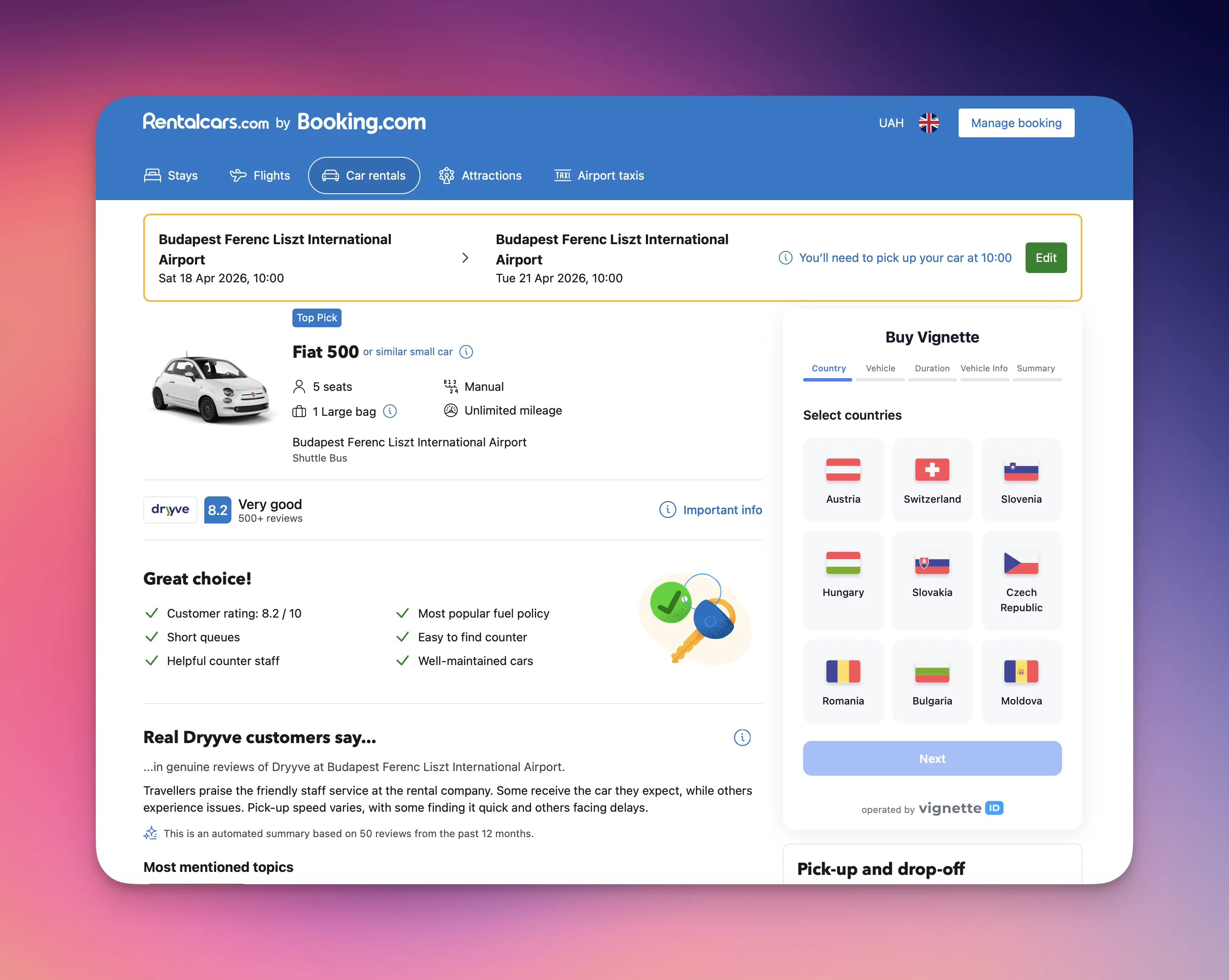
![Vignette widget embedded on a car rental booking page](/widget/widget-preview.webp)

## Quick Start

Add the widget to any webpage with just few lines of code:

```html
<div id="vignette-widget"></div>
<script src="https://widget.vgnt.app/vignette-widget.js"></script>
<script>
  VignetteWidget.init({
    container: '#vignette-widget',
    apiKey: 'YOUR_API_KEY',
    apiUrl: 'https://api.vignette.id',
    locale: 'uk',
    currency: 'EUR',
  });
</script>
```

## Installation Methods

### Script Tag (Recommended)

```html
<script src="https://widget.vgnt.app/vignette-widget.js"></script>
```

### Dynamic Injection (Console / Programmatic)

```js
(function(){
  var d = document.createElement('div');
  d.id = 'vw-' + Date.now();
  document.body.appendChild(d);
  var s = document.createElement('script');
  s.src = 'https://widget.vgnt.app/vignette-widget.js';
  s.onload = function(){
    VignetteWidget.init({
      container: '#' + d.id,
      apiKey: 'YOUR_API_KEY',
      apiUrl: 'https://api.vignette.id',
      locale: 'uk',
      currency: 'EUR',
      position: 'bottom-right',
      fabLabel: 'Buy Vignette',
    });
  };
  document.head.appendChild(s);
})();
```

## Configuration

### `VignetteWidget.init(config)`

| Parameter | Type | Required | Default | Description |
|-----------|------|----------|---------|-------------|
| `container` | `string \| HTMLElement` | Yes | — | CSS selector or DOM element for the widget |
| `apiKey` | `string` | Yes | — | Your Vignette ID API key |
| `apiUrl` | `string` | No | `https://api.vignette.id` | API base URL. Use `https://sandbox-api.vignette.id` for testing |
| `locale` | `'uk' \| 'en'` | No | `'uk'` | Widget language |
| `currency` | `'EUR' \| 'UAH' \| 'USD' \| 'PLN' \| 'HUF'` | No | `'EUR'` | Display currency |
| `theme` | `'light' \| 'dark'` | No | `'light'` | Color theme |
| `position` | `'inline' \| 'bottom-right' \| 'bottom-left'` | No | `'inline'` | Widget positioning mode |
| `title` | `string` | No | Localized "Buy Vignette" | Header text shown above the step indicator. Independent from `fabLabel`. |
| `fabLabel` | `string` | No | Localized "Buy Vignette" | Text on the floating action button (only for `bottom-right` / `bottom-left`) |
| `width` | `number \| string` | No | `'100%'` | Widget width. Number → pixels (`600`). Any valid CSS length works: `'600px'`, `'100%'`, `'50vw'`, `'min(600px, 90%)'`. |
| `countries` | `string[]` | No | All available | Filter which countries to show (e.g. `['at', 'ch', 'hu']`) |
| `vehicleTypes` | `Array<'car' \| 'van' \| 'moto'>` | No | All available | Restrict selectable vehicle types. If exactly one type is provided, the vehicle step is auto-selected and skipped. |
| `plateCountry` | `string` | No | — | Pre-select the vehicle registration country on step 4. Accepts a 2-letter ISO code (case-insensitive) from the [registration-country list](#registration-countries). Unknown codes are ignored with a `console.warn`. When omitted, the select shows its placeholder until the user picks. |
| `plate` | `string` | No | — | Pre-fill the license plate on step 4. Whitespace is trimmed, letters are uppercased, and characters that wouldn't be accepted by the input (Cyrillic, extended Latin, dash for non-AT/DE plates) are silently stripped — a `console.warn` is emitted if the value changed. Pair with `plateCountry: 'at'` or `'de'` to keep dashes. |
| `vinCode` | `string` | No | — | Pre-fill the VIN on step 4. Truncated to 17 characters and filtered to A–H, J–N, P, R–Z and 0–9 (ISO 3779 charset, no I/O/Q). Stored regardless of which countries the user selects — the VIN field only renders when Romania or Moldova is in the selection, but the value persists if the user adds them later. |
| `vehicleEditable` | `boolean` | No | `true` | When `false`, the dedicated vehicle-info step is skipped — the partner must supply `plate` and `plateCountry` (and `vinCode` if the user can pick Romania or Moldova) via init. If those are missing, the option falls back to `true` with a `console.warn`. Email and (for Moldova) full name + passport stay on the Summary step regardless. |
| `onComplete` | `function` | No | — | Callback after order creation |

### Position Modes

#### `inline` (default)

The widget renders directly inside the container element, embedded in the page flow.

```js
VignetteWidget.init({
  container: '#vignette-widget',
  apiKey: 'YOUR_API_KEY',
  position: 'inline',
});
```

#### `bottom-right` / `bottom-left`

The widget appears as a floating button (FAB) in the corner of the screen. Clicking the button opens the widget panel.

```js
VignetteWidget.init({
  container: '#vignette-widget',
  apiKey: 'YOUR_API_KEY',
  position: 'bottom-right',
  fabLabel: 'Buy Vignette',
});
```

## Supported Countries

| Code | Country |
|------|---------|
| `at` | Austria |
| `ch` | Switzerland |
| `si` | Slovenia |
| `hu` | Hungary |
| `sk` | Slovakia |
| `cz` | Czech Republic |
| `ro` | Romania |
| `bg` | Bulgaria |
| `md` | Moldova |

Countries without available products are automatically hidden from the list.

## Registration Countries

The `plateCountry` option accepts any of the following ISO codes (passed lowercase). The same list is also shown in the step-4 registration-country `<select>` inside the widget, so prefilling matches what the user would see manually.

Codes include all EEA countries plus a wide set of non-EU origins (UA, TR, GE, UZ, KZ, etc.) to cover foreign-registered vehicles transiting through.

<details>
<summary>Show full list (84 codes)</summary>

```
ad ae af al am at az ba be bg by ca ch cn cy cz de dk dz ee eg es fi fr gb ge gi gr hr hu ie il in iq ir is it jo jp kg kr kw kz lb li lt lu lv ly ma mc md me mk mn mt nl no np pk pl ps pt ro rs ru sa se sg si sk sm sy th tm tn tr ua us uz va vn xk ye
```

</details>

## Purchase Flow

The widget guides users through 5 steps (4 when `vehicleEditable: false`):

1. **Country** — Select one or multiple countries (multi-select)
2. **Vehicle Type** — Car, Van, or Motorcycle (filtered by selected countries)
3. **Duration** — Choose vignette period per country with start date picker
4. **Vehicle Info** — License plate, registration country (VIN for RO/MD). Skipped when `vehicleEditable: false` and the partner has supplied this data via init.
5. **Summary** — Order review, total price, **email** (and for Moldova: full name, passport country, passport number), terms checkbox, payment

### Input Validation

- License plate: Latin letters, digits, and spaces only. Dash (`-`) allowed for Austrian and German plates
- Cyrillic characters are blocked with an error message prompting to switch keyboard language
- Extended Latin characters (e.g. `ü`, `á`, `ș`) are blocked with a specific error message
- Email: ASCII characters only
- VIN: 17 alphanumeric characters (excluding I, O, Q)

## Payment

After clicking "Pay", the widget creates an order via the API and displays the payment page (Stripe) inside an iframe. Upon successful payment, the user is redirected to a success page.

### Payment Redirect URLs

Configure these URLs in your Vignette ID partner dashboard:

```
SUCCESS REDIRECT URL:  https://widget.vgnt.app/payment/success
ERROR REDIRECT URL:    https://widget.vgnt.app/payment/error
```

## Callback

Use `onComplete` to handle the order result in your application:

```js
VignetteWidget.init({
  container: '#vignette-widget',
  apiKey: 'YOUR_API_KEY',
  onComplete: function(order) {
    console.log('Payment link:', order.payment_link);
    console.log('Order ID:', order.order_id);
    // Redirect or show custom UI
    window.location.href = order.payment_link;
  },
});
```

When `onComplete` is provided, the widget will call it instead of showing the payment iframe.

## Environments

| Environment | API URL | Description |
|-------------|---------|-------------|
| Production | `https://api.vignette.id` | Live orders with real payments |
| Sandbox | `https://sandbox-api.vignette.id` | Test orders, no real charges |

### Sandbox Test Card

```
Card number: 4242 4242 4242 4242
Expiry: any future date
CVC: any 3 digits
```

## Examples

### Minimal (Inline)

```html
<div id="vignette-widget"></div>
<script src="https://widget.vgnt.app/vignette-widget.js"></script>
<script>
  VignetteWidget.init({
    container: '#vignette-widget',
    apiKey: 'YOUR_API_KEY',
  });
</script>
```

### Floating Widget with Filtered Countries

```html
<div id="vignette-widget"></div>
<script src="https://widget.vgnt.app/vignette-widget.js"></script>
<script>
  VignetteWidget.init({
    container: '#vignette-widget',
    apiKey: 'YOUR_API_KEY',
    locale: 'en',
    currency: 'EUR',
    position: 'bottom-right',
    fabLabel: 'Buy Vignette',
    countries: ['at', 'ch', 'si', 'hu'],
  });
</script>
```

### Dark Theme

```html
<div id="vignette-widget"></div>
<script src="https://widget.vgnt.app/vignette-widget.js"></script>
<script>
  VignetteWidget.init({
    container: '#vignette-widget',
    apiKey: 'YOUR_API_KEY',
    theme: 'dark',
  });
</script>
```

### Pre-selected Registration Country

When you know most of your traffic comes from one origin country (e.g. Ukrainian drivers on a UA site), pre-fill the registration-country field so users skip one click.

```html
<div id="vignette-widget"></div>
<script src="https://widget.vgnt.app/vignette-widget.js"></script>
<script>
  VignetteWidget.init({
    container: '#vignette-widget',
    apiKey: 'YOUR_API_KEY',
    plateCountry: 'ua',
  });
</script>
```

### Pre-filled Plate & VIN (rental flow)

When the partner already has the vehicle data — for example, a car-rental site that knows the customer's booked car — pass `plate` and `vinCode` so step 4 is fully prefilled and the user only confirms.

```html
<div id="vignette-widget"></div>
<script src="https://widget.vgnt.app/vignette-widget.js"></script>
<script>
  VignetteWidget.init({
    container: '#vignette-widget',
    apiKey: 'YOUR_API_KEY',
    plateCountry: 'at',
    plate: 'W-12345X',
    vinCode: 'WVWZZZ3CZWE123456',
  });
</script>
```

`plate` is filtered the same way as user-typed input — dashes are kept only for `at` and `de`, and any Cyrillic / extended-Latin / non-allowed characters are stripped (with a `console.warn` so you can see what got dropped). `vinCode` is uppercased, truncated to 17 chars, and any I/O/Q (or other forbidden chars) are removed.

### Hide the Vehicle-Info step entirely

When you already know everything about the vehicle (e.g. a fleet partner whose backend knows the car), set `vehicleEditable: false` to skip the vehicle-info step. The user only confirms on the Summary step. **You must supply `plate` and `plateCountry`** (and `vinCode` if Romania or Moldova may be in the selection) — otherwise the widget falls back to `vehicleEditable: true` with a console warning to avoid trapping the user.

```html
<div id="vignette-widget"></div>
<script src="https://widget.vgnt.app/vignette-widget.js"></script>
<script>
  VignetteWidget.init({
    container: '#vignette-widget',
    apiKey: 'YOUR_API_KEY',
    countries: ['at', 'ch', 'si'],
    vehicleEditable: false,
    plateCountry: 'ua',
    plate: 'KA6797MT',
  });
</script>
```

The Summary step still collects **email** (always) and **full name + passport country + passport number** (when Moldova is selectable) — those identity fields are required by the API and are never auto-filled.

## Lifecycle

`init()` returns a handle object with a `destroy()` method. Call it when you tear the widget down — SPA route changes, conditional rendering, modal close — to free resources.

```js
const widget = VignetteWidget.init({
  container: '#vignette-widget',
  apiKey: 'YOUR_API_KEY',
});

// later
widget.destroy();
```

`destroy()` clears the shadow DOM, removes the internal `postMessage` listener for payment callbacks, and cancels any pending rate-limit retry timers. Safe to call multiple times.

Without `destroy()`, repeated `init()` calls on the same page accumulate `postMessage` listeners on `window` — harmless but leaky.

## Technical Details

- **Bundle size**: ~137 KB (38 KB gzipped)
- **Dependencies**: None (Vanilla TypeScript)
- **Style isolation**: Shadow DOM — widget styles don't affect the host page
- **Browser support**: All modern browsers (Chrome, Firefox, Safari, Edge)
- **Mobile**: Fully responsive, adapts to screen width
